Chapter 21 Working With Images
Images are a valueable potential source of information, and image processing, including image recognition, is also an important application of machine learning.
We assume you have loaded the following packages:
## /home/otoomet/R/x86_64-pc-linux-gnu-library/4.5/reticulate/python/rpytools/loader.py:120: UserWarning: Pandas requires version '1.3.6' or newer of 'bottleneck' (version '1.3.5' currently installed).
## return _find_and_load(name, import_)21.1 Loading images
Images can be read using matplotlib’s plt.imread(). This is a handy
function that can read jpg and png images into an array. Below and
example with a 4-layer color image. I’ll load a tiny image (\(8\times
5\) pixels) of Scottish flag:
## (5, 8, 4)## array([[0.93, 0.81, 0.31, 0. , 0. , 0.23, 0.77, 0.95],
## [0.18, 0.74, 0.95, 0.64, 0.58, 0.95, 0.78, 0.25],
## [0. , 0. , 0.55, 0.99, 1. , 0.63, 0. , 0. ],
## [0.04, 0.68, 0.96, 0.71, 0.66, 0.96, 0.73, 0.16],
## [0.9 , 0.86, 0.38, 0. , 0. , 0.33, 0.82, 0.93]], dtype=float32)## array([[0.95, 0.84, 0.47, 0.37, 0.37, 0.43, 0.81, 0.96],
## [0.41, 0.78, 0.96, 0.71, 0.66, 0.96, 0.82, 0.44],
## [0.37, 0.37, 0.63, 1. , 1. , 0.69, 0.37, 0.37],
## [0.38, 0.73, 0.96, 0.75, 0.72, 0.96, 0.77, 0.4 ],
## [0.92, 0.88, 0.51, 0.37, 0.37, 0.48, 0.85, 0.94]], dtype=float32)## array([[0.97, 0.91, 0.75, 0.72, 0.72, 0.74, 0.9 , 0.98],
## [0.73, 0.88, 0.98, 0.85, 0.83, 0.98, 0.9 , 0.74],
## [0.72, 0.72, 0.82, 1. , 1. , 0.84, 0.72, 0.72],
## [0.73, 0.86, 0.98, 0.87, 0.85, 0.98, 0.88, 0.73],
## [0.95, 0.94, 0.77, 0.72, 0.72, 0.76, 0.92, 0.96]], dtype=float32)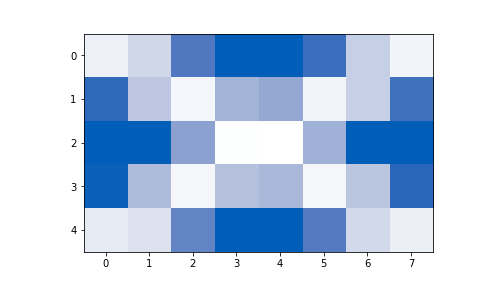
plot of chunk unnamed-chunk-2
The dimension of the resulting array is \(5 \times 8 \times 4\). The
first two dimensions, \(5\times 8\) denote the height and width of the
image. imread() uses the common way of denoting the dimension of
matrices–rows first (counting from top), and columns second. This
may cause quite a headache as in case of pictures we normally think in
terms of horizontal position first and vertical second (counting from
bottom).