Parse Ownership Documentation
The Parse Ownership tool takes the ownership data that appears in a textual form in Compact D/SEC
and parses it into either a Comma Separated Values (CSV) list, or directly into an Excel spreadsheet.
Why is this necessary?
Unlike many other fields in Compact D/SEC, the ownership data cannot be directly and cleanly
downloaded into spreadsheet readable format. Instead you must download it in its textual format then
manually extract the particular data you need. This tool eliminates the second step by taking the
downloaded text information and automatically parsing it into a spreadsheet readable format.
Instructions
First you need to identify within Compact D/SEC the companies for which you want the data. You can
use any of the standard search features within Compact D/SEC or use the Search Builder tool.
Once you have the companies identfied, you will need to download them in a particular format expected
by the Parse Ownership tool.
- From the 'Display' menu, select 'User Defined Format'
- From the 'Define Format' dialog select the following fields:
(Hold down the Control key and click to select multiple fields)
- CO-NAME
- TS-TICKER SYMBOL
- CU-CUSIP NO
- SH-OWNERSHIP
You can also download the ownership.udf then from the 'Define Format'
dialog, click on 'Use Saved' and select 'ownership.udf' from the file select window.
With these fields selected, the display should look something like this:
 ALBERTSON S INC
  TICKER SYMBOL: ABS
  CUSIP NO: 013104104

  OWNERSHIP:
  MARKUS, STIFTUNG,  6.90% (PRX 04-20-2000)
  CAPITAL RESEARCH AND MANAGEMENT  CO.,  11.70% (PRX 04-20-2000)
      ***
    TYPE          DATE(Q,M)    OWNERS    CHANGE (000S) HELD  %OWN
    INSTITUTIONS  06/30/2000(Q)  470        NIL     281,665 66.50
    5% OWNERS     06/30/2000(M)    2         NA      71,645 16.92
    INSIDERS      07/31/2000(M)   34         NA       2,896  0.68
- Download the data:
- From the 'File' menu select 'Save Documents'; or
Click on the xxx icon on the toolbar
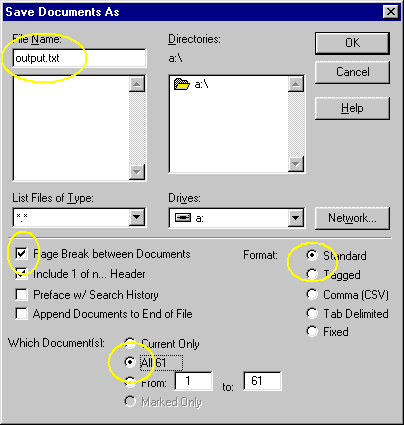
- From the 'Save Documents As' dialog:
- Check 'Page Breaks between Documents'
- Select 'All (xxx)'
- Select 'Standard' format
- Select the proper directory and give the file a name
In this format, you should be able to safely download about 2,000 companies to an empty floppy without running out of space. It is,
however, much faster to download the data to the hard drive and copy it to a floppy after the download is complete.
If you have any questions you can contact me at: murata@u.washington.edu.